

Configuring Environment Variables
Environment variables are key-value pairs that are stored outside of source code. The values of environment variables can be applied to particular environments in order to change behavior or configuration.
Environment variables can be read into source code and many configuration files in your project. Variables are only applied to environments on new deployments. If you change an environment variable, you must redeploy the environment in order for the updated value to take effect.
Environment variables can be configuration or secrets. While all values are stored encrypted at rest, only non-secret values can be read. Secrets are write-only, meaning the value can't be retrieved once it's set.
API Reference For detailed information about accessing environment variables in code, see the Environment Variables API Reference.
Environment Variable Editor
To set environment variables in your project, click Settings and then select Environment Variables.
To create a new variable, click Add new variable.
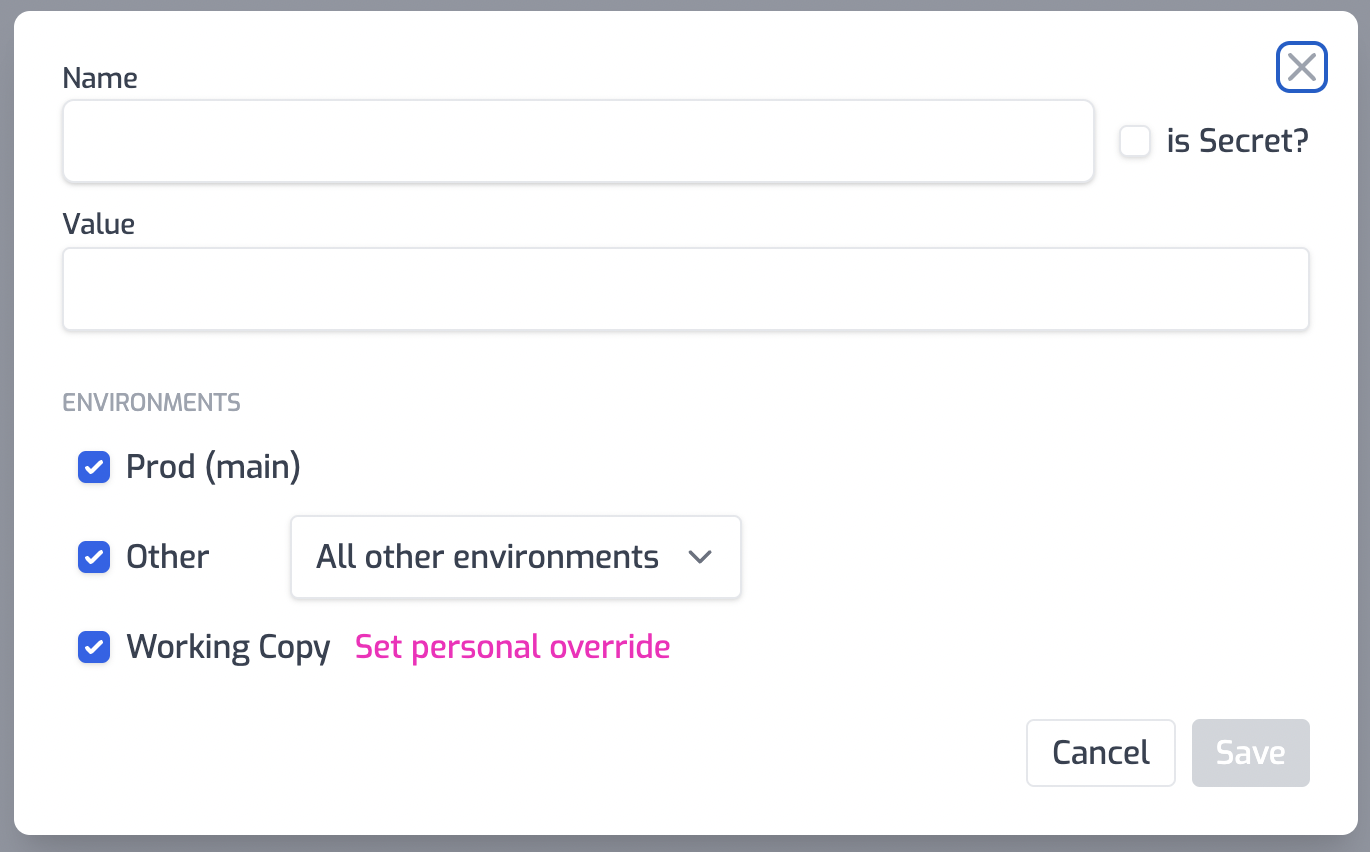
Enter the name and value of your environment variable and select if you would like the value to be a secret or a regular value.
Environments
Environment variables can be applied to one or many different environments. You can select one or more environments in which to apply the variable.
| Environment | Description |
|---|---|
| Prod | The environment that's deployed from your default branch in source control. This is usually called main. |
| Preview | Any environment that's deployed from source control that's not the default branch. (for example staging or preview). This also includes any branch that's created from a pull request. |
| Development (Working Copy) | Any environment that's deployed while developing with the portal. Each developer gets their own development environment. These environments are always deployed to zuplo.dev |
For the Preview environment option, a specific named environment can be
selected. For example, if you want a variable set only for the environment
deployed from the staging branch in source control.
For the Working Copy option, developers can set a personal override. This value ONLY applies to the developer who set the value.
A single environment variable name can't overlap environments. For example, if
you set a variable named MY_VAR and select all the environments a second
variable named MY_VAR can't be set on say the Production environments.
Reserved Environment Variables
Environment variables can't start with ZUPLO_ or __ZUPLO. The same
restriction applies to names beginning with ZUDOKU_.
If you need a variable that's exposed to the
Developer Portal build, prefix it with
ZUPLO_PUBLIC_ (or ZUDOKU_PUBLIC_). Public-prefixed variables are bundled
into the portal's static output and must not contain secrets, as they're
visible to anyone who loads the page.
Using Environment Variables
Environment variables can be used in several places in your Zuplo project. Each location has its own syntax:
| Location | Syntax | Resolved |
|---|---|---|
| Custom code (handlers, policies, hooks) | environment.VAR_NAME | Runtime |
Configuration files (policies.json, OpenAPI routes) | $env(VAR_NAME) | Build time |
| URL Rewrite, URL Forward, and WebSocket handlers | ${env.VAR_NAME} | Runtime (per request) |
Developer Portal config (zudoku.config.ts) | process.env.VAR_NAME | Portal build time |
In Code
Variables are accessed through the environment object from @zuplo/runtime.
See the
Environment Variables API Reference for
detailed usage examples and patterns.
Code
In Configuration Files
Inside policy options, route handler options, and CORS policy options,
environment variables can be referenced with the $env(VAR_NAME) pattern.
Substitutions happen at build time — the build replaces each $env() expression
with a reference to the runtime environment object before the project is
deployed.
Where $env() is allowed
config/policies.json— any property underpolicies[].handler.options, including nested objects and array elementsconfig/policies.json— any direct property of acorsPolicies[]entry, such asallowedOrigins,allowedHeaders,allowedMethods,exposeHeaders, andmaxAgeconfig/routes.oas.json(and other OpenAPI route files) — any property under a route'sx-zuplo-route.handler.options, including nested objects and array elements
$env() is not allowed in other locations such as policy name,
policyType, module, route paths, or top-level OpenAPI fields. Using it
elsewhere produces a build error:
Code
Standalone substitution
When the value is only an $env() expression, the variable's value is
inserted directly. The runtime type matches the type of the environment variable
(always a string when set, undefined when not).
Code
String interpolation
You can mix $env() with literal text to compose a value. The build wraps the
result in a JavaScript template literal that's evaluated at runtime, so each
request gets the current value of the variable.
Code
If the variable isn't set, the interpolated portion resolves to an empty string.
For example, with API_HOST unset, "https://$env(API_HOST)/v1" becomes
"https:///v1". Use a standalone $env() (no surrounding text) if you need to
detect an unset variable in your handler or policy code.
In arrays
$env() works inside string array elements, including mixed arrays where some
elements are static and others are interpolated:
Code
In nested objects
$env() works at any depth within a handler or policy options object:
Code
Variable name rules
The name inside $env(...) is matched literally up to the first closing
parenthesis. Use only letters, digits, and underscores in the name — matching
what the Zuplo Portal accepts when you create
the variable.
Rewrite, Forwarding, and WebSocket Handlers
The URL Rewrite handler's rewritePattern, the URL Forward handler's baseUrl,
and the WebSocket handler's rewritePattern use a different syntax. These
options are evaluated as JavaScript template literals at request time, so you
reference variables with ${env.VAR_NAME}:
Code
Because rewritePattern and baseUrl run as code, they also have access to the
request, URL parts, route params, and query string. See the
URL Rewrite Handler docs for the full list of
available variables.
Using $env(VAR_NAME) inside rewritePattern or baseUrl is the most common
mistake. The build will warn you when it detects this, but the value will be
passed through to the handler as a literal string and the rewrite will fail at
runtime. Always use ${env.VAR_NAME} in these two options.
In the Developer Portal
The Developer Portal's zudoku.config.ts runs in Node-like build tooling and
uses process.env rather than $env():
zudoku.config.ts
Only variables prefixed with ZUPLO_PUBLIC_ (or ZUDOKU_PUBLIC_) are available
in the portal build, and their values are embedded into the client-side bundle.
Don't use this prefix for any value that should remain private.
System Environment Variables
The following variables are automatically set by the system and are available to use in your code:
ZUPLO_ENVIRONMENT_TYPE- The current environment type the API is running. Values areedge,local.ZUPLO_ENVIRONMENT_STAGE- The stage of the environment. Values areproduction,preview,working-copy, andlocal.ZUPLO_ENVIRONMENT_NAME- The name of the environment. This is a globally unique name for the environment. This is the same name that's used in the URL of the environment. For example,my-project-main-1235.zuplo.app. Setting a custom domain on the environment won't change this value.ZUPLO_ACCOUNT_NAME- The name of the Zuplo account where the environment is deployed.ZUPLO_PROJECT_NAME- The name of the project where the environment is deployed.ZUPLO_BUILD_ID- The build ID of the environment. This is a unique ID for each build of the environment. This is a UUID.ZUPLO_COMPATIBILITY_DATE- The compatibility date of runtime environment.